

MTK Auth Bypass Tool V7 allows you to bypass authentication (SLA/DAA) on MediaTek (MTK) chipset devices, enabling deep flashing, firmware flashing, FRP removal, and repair operations using tools like SP Flash Tool without needing official auth files.
In addition, this tool is particularly helpful for technicians and advanced users working on MTK-powered smartphones and tablets that have secure boot restrictions.
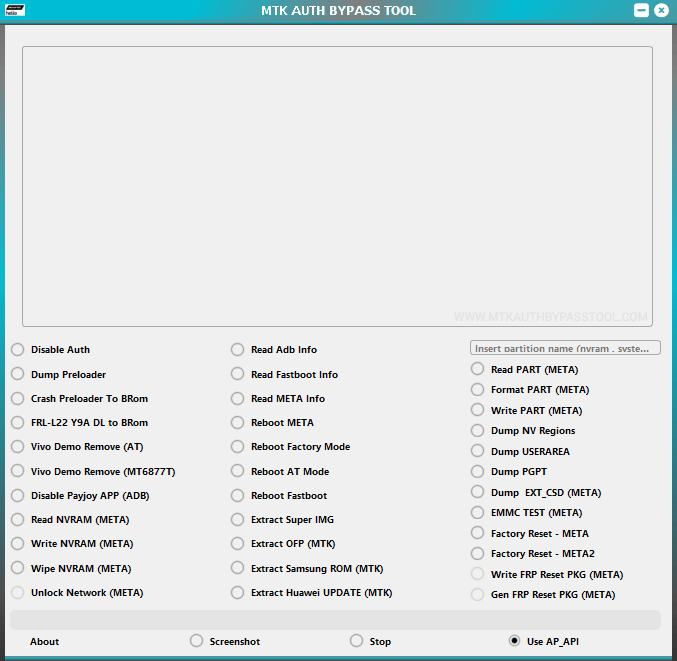
MTK Auth Bypass Tool V7 for Windows
The MTK Auth Bypass Tool V7 enables users to bypass MediaTek authentication protections on supported devices, allowing seamless communication with flashing tools in BROM or Preloader mode. It supports turning off auth for firmware flashing, IMEI repair, FRP bypass, and unbricking MTK devices.
There may be various situations where it is necessary to use the MTK Auth Bypass Tool V7 to establish a connection and perform operations on a device. Such situations may include:
- Bypassing SLA/DAA authentication for SP Flash Tool usage.
- Flashing stock or custom firmware on protected MTK devices.
- Removing FRP (Factory Reset Protection) locks.
- Repairing IMEI, unbricking devices stuck in bootloops, or performing other advanced repairs.
Download MTK Auth Bypass Tool V7
| Name | MTK Auth Bypass Tool V7 |
| Type | MediaTek Authentication Bypass Utility |
| Developer | Youssef Mofadal |
| File Name | MTK_Auth_Bypass_Tool_V7.zip |
| File Size | 9.28 MB |
| Version | V7 |
| Supports | Microsoft Windows (64-bit preferred) |
| Password | MABT123 |
Frequently Asked Questions
What is MTK Auth Bypass Tool V7?
MTK Auth Bypass Tool V7 is a utility designed to bypass MediaTek (MTK) SLA and DAA authentication on devices with MediaTek chipsets. It helps users enter deep flashing modes for repair, flashing, and unlocking operations on various MTK-powered smartphones and tablets.
How do I use the MTK Auth Bypass Tool V7?
Download and extract the tool. Install MTK USB drivers and optionally LibUSB/UsbDk. Run the executable (e.g., MTK Auth Bypass Tool.exe), select Disable Auth, Power off the device, and connect it in BROM mode (usually by holding Volume Up + Volume Down + Power while connecting USB). Follow on-screen instructions.
Is MTK Auth Bypass Tool V7 Free?
Yes, the MTK Auth Bypass Tool V7 is generally available as a free community-developed utility for MediaTek device servicing.
Is MTK Auth Bypass Tool V7 Safe?
Yes, the MTK Auth Bypass Tool V7 is safe for computers, laptops, and MediaTek devices. Always scan files with antivirus software and understand the risks involved with flashing tools, as improper use can brick devices.
Does MTK Auth Bypass Tool V7 support SP Flash Tool?
Yes, MTK Auth Bypass Tool V7 is primarily used to enable SP Flash Tool (and other MTK tools) by disabling authentication, allowing firmware flashing and other operations on protected devices.
Does MTK Auth Bypass Tool V7 support FRP Bypass and IMEI Repair?
Yes, it supports workflows for FRP removal and IMEI repair on many MTK devices when combined with compatible flashing tools.
